Racing: Difference between revisions
No edit summary |
No edit summary |
||
| (4 intermediate revisions by the same user not shown) | |||
| Line 2: | Line 2: | ||
== Tracks == | == Tracks == | ||
{| class="wikitable" | {| class="wikitable" | ||
|+ Track | |+ Track overview | ||
|- | |- | ||
! Track Name !! | ! Track Name !! Min. bet amount !! Max. bet amount !! Min. participants !! Max. participants !! Rounds | ||
|- | |- | ||
| Everon Dirt Cup || 25.000 || 100.000 || 2 || 4 || 3 | | Everon Dirt Cup || 25.000 || 100.000 || 2 || 4 || 3 | ||
| Line 23: | Line 23: | ||
If you want to start a race event, you must first go to an '''NPC at the desired track'''. These are '''marked on the map'''. You can then start an event there, for which you can then '''set the bet'''. As soon as you have created the event, '''every player''' receives a '''message that a race has been started''' and can then '''register for it within a given period'''. | If you want to start a race event, you must first go to an '''NPC at the desired track'''. These are '''marked on the map'''. You can then start an event there, for which you can then '''set the bet'''. As soon as you have created the event, '''every player''' receives a '''message that a race has been started''' and can then '''register for it within a given period'''. | ||
[[File:RacingEventStartNotification.png|thumb|alt=Notification|New race notification]] | [[File:RacingEventStartNotification.png|thumb|alt=Notification|New race notification]] | ||
=== Join a existing | === Join a existing race === | ||
When you '''get the message''' that a race has been started and you '''decide to take part in it''', you have to go to the '''corresponding NPC''' and '''register''' there. On the spot you will then see the bet again. After you have registered, you must '''wait until''' either the '''maximum number of participants have registered''' or the '''given registration period is over'''. If '''not enough participants have registered''', the event will be '''cancelled''' and each participant will '''get their bet back'''. | When you '''get the message''' that a race has been started and you '''decide to take part in it''', you have to go to the '''corresponding NPC''' and '''register''' there. On the spot you will then see the bet again. After you have registered, you must '''wait until''' either the '''maximum number of participants have registered''' or the '''given registration period is over'''. If '''not enough participants have registered''', the event will be '''cancelled''' and each participant will '''get their bet back'''. | ||
<gallery> | <gallery> | ||
| Line 49: | Line 49: | ||
== Racing stats in user-panel == | == Racing stats in user-panel == | ||
[[File:RacingUserPanel.png|thumb|alt=User Panel|Racing in the user panel]] | [[File:RacingUserPanel.png|thumb|alt=User Panel|Racing in the user panel]] | ||
In the ''' | In the '''[[User panel|User-Panel]]''', information on the races that have been run can be called up. Among other things, you can see '''which track''' was raced, what the '''stakes''' were, how '''many participants''' the race had, which '''placing you achieved''' yourself, and '''when''' and '''on which server''' the race was held. | ||
== Videos == | |||
* [https://www.youtube.com/watch?v=3Sjj-TQ6V7U Team ELAN - Arma Reforger Life - Changelog 05.03.2023 (v.0.2.146)] | |||
[[Category:Features]] | [[Category:Features]] | ||
Latest revision as of 00:45, 1 May 2023
On Everon you have the opportunity to start your career as a racing driver. For this purpose, there is the racing system, which includes various tracks. You can also earn money there by placing bets. The racing system is fully integrated into everyday life and can therefore be used at any time and by anyone.
Tracks
| Track Name | Min. bet amount | Max. bet amount | Min. participants | Max. participants | Rounds |
|---|---|---|---|---|---|
| Everon Dirt Cup | 25.000 | 100.000 | 2 | 4 | 3 |
| Everon Southern Island Cup | 100.000 | 1.000.000 | 2 | 10 | 1 |
| Everon Main Road Cup | 250.000 | 1.000.000 | 2 | 8 | 1 |
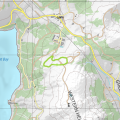
Everon Dirt Cup
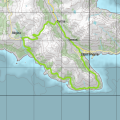
Everon Southern Island Cup
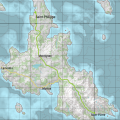
Everon Main Road Cup


How does it work?
Create a race event


If you want to start a race event, you must first go to an NPC at the desired track. These are marked on the map. You can then start an event there, for which you can then set the bet. As soon as you have created the event, every player receives a message that a race has been started and can then register for it within a given period.

Join a existing race
When you get the message that a race has been started and you decide to take part in it, you have to go to the corresponding NPC and register there. On the spot you will then see the bet again. After you have registered, you must wait until either the maximum number of participants have registered or the given registration period is over. If not enough participants have registered, the event will be cancelled and each participant will get their bet back.
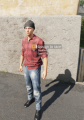
Join existing race event
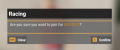
Join an existing Race


Race startup procedure
Once the maximum number of participants has registered or the registration deadline has passed, the race enters the start-up phase. Here, each participant is assigned a starting position to which they must then move. Each participant must then place his or her car correctly in the specified markings. The arrow above the mark shows whether you are standing correctly. If it turns green, you are in the right position, if it turns red, you are in the wrong position.

Arrow (wrong position)

Arrow (right position)


Race start
As soon as each participant is correctly positioned, the race is started and a countdown begins. As soon as all lights are green, the race may start. If a competitor starts before this, the race returns to the previous startup phase and each competitor must move back to their predefined position.
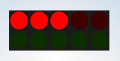
Start light during countdown
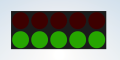
Start light on go


During the Race
During the race, each participant must then pass checkpoints. Only when a checkpoint has been passed does the next one become visible. After passing all the checkpoints, you reach the finish line. After the first participant has passed the finish line, the remaining participants have a certain amount of time to finish the race. If all participants pass the finish line, the race is finished, the respective times are shown and the prize money is paid out. If not all participants make it to the finish, the race is also ended after the given time period. If four or more participants make it to the finish, the prize money is divided among the first three participants, otherwise the first one wins the entire amount.
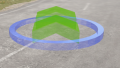
Checkpoint
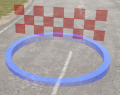
Finish Line


Racing stats in user-panel

In the User-Panel, information on the races that have been run can be called up. Among other things, you can see which track was raced, what the stakes were, how many participants the race had, which placing you achieved yourself, and when and on which server the race was held.